While your smartphone might get you from point A to point B, it can’t account for your rig’s height clearance or weight restrictions—and it definitely won’t protect you with dash cam footage when things go wrong. You need a GPS system that’s built specifically for commercial driving, one that combines smart routing with continuous video recording. The right device will transform how you navigate highways and handle unexpected incidents, but choosing between features isn’t as straightforward as you’d think.
Quick Overview
- Rand McNally TND 750 features a 7-inch touchscreen, custom truck routing, dynamic weather overlays, and built-in dash cam.
- Garmin RV Cam 795 offers 7-inch display, truck-specific routing, integrated dash cam, and extensive North American RV park mapping.
- Both units provide custom routing based on vehicle dimensions, weight restrictions, and real-time traffic to avoid hazardous routes.
- Dash cams should offer minimum 1080p resolution, 30-60fps frame rates, and wide field of view up to 170 degrees.
- Essential features include regular map updates, anti-glare screens, truck-compatible mounting systems, and reliable poor-weather visibility.
| Rand McNally TND 750 GPS Truck Navigator |
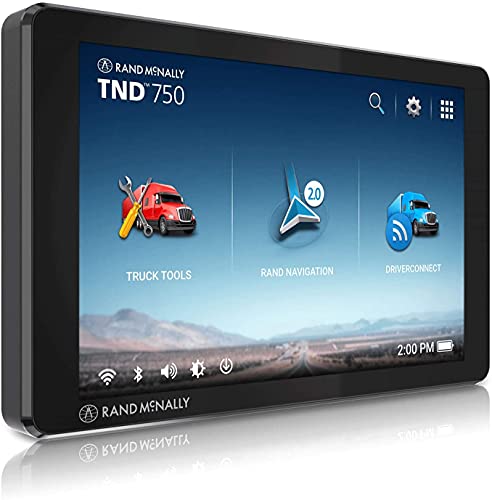
| Best for Truckers | Screen Size: 7 inches | Built-in Dash Cam: Yes, integrated dash cam | Custom Routing: Custom truck routing | VIEW LATEST PRICE | Read Our Analysis |
| Garmin RV Cam 795 GPS Navigator with Dash Cam |

| Best for RVs | Screen Size: 7 inches | Built-in Dash Cam: Yes, integrated dash cam with Vault upload | Custom Routing: Custom RV routing by size/weight | VIEW LATEST PRICE | Read Our Analysis |
More Details on Our Top Picks
Rand McNally TND 750 GPS Truck Navigator
TheRand McNally TND 750 stands out as the best truck GPS with dash cam for professional drivers who need thorough routing tailored to their vehicle’s specific dimensions. This sixth-generation navigator features a 7-inch touchscreen that’s easy to read while driving. You’ll appreciate the dynamic weather overlays showing precipitation, temperature, and wind speed along your route, helping you anticipate challenging conditions. The built-in dash cam adds security and documentation capabilities. Enhanced 3D buildings and landmarks improve navigation accuracy in unfamiliar areas. The sleek design houses custom truck routing technology that accounts for your vehicle’s specifications, ensuring you’re directed along appropriate roads.
- Screen Size:7 inches
- Built-in Dash Cam:Yes, integrated dash cam
- Custom Routing:Custom truck routing
- Safety Alerts:Not specified
- Weather Features:Dynamic weather overlays (precipitation, temperature, wind speed)
- Points of Interest:3D buildings and landmarks
- Additional Feature:3D buildings and landmarks
- Additional Feature:Amazon Renewed program eligibility
- Additional Feature:90 days limited warranty
Garmin RV Cam 795 GPS Navigator with Dash Cam
With its expansive 7-inch touchscreen and extensive North American mapping, the Garmin RV Cam 795 GPS Navigator stands out as an ideal choice for RV owners who need truck-specific routing combined with integrated dash cam protection. You’ll benefit from custom routing based on your vehicle’s size and weight, helping you avoid low bridges and narrow roads. The integrated dash cam automatically saves footage to Garmin’s secure online Vault through the Drive app. You’ll receive forward collision and lane departure warnings, plus alerts for school zones and sharp curves. Access thousands of RV parks, campgrounds, and points of interest with Tripadvisor ratings included.
- Screen Size:7 inches
- Built-in Dash Cam:Yes, integrated dash cam with Vault upload
- Custom Routing:Custom RV routing by size/weight
- Safety Alerts:Forward collision, lane departure, school zones, speed changes
- Weather Features:Not specified
- Points of Interest:RV parks, campgrounds, KOA, national parks, Tripadvisor ratings
- Additional Feature:BirdsEye Satellite Imagery
- Additional Feature:Garmin voice assist capability
- Additional Feature:Secure online Vault storage
Factors to Consider When Choosing a Truck GPS With Dash Cam
When you’re shopping for a truck GPS with dash cam, you’ll need to evaluate several critical features that directly impact your driving experience. The right device should offer a clear, readable screen that won’t strain your eyes during long hauls while providing customized routing based on your truck’s specific dimensions and weight. You’ll also want to assess the dash cam’s video quality, map coverage reliability, and how easily the unit mounts in your particular vehicle.
Screen Size and Visibility
Screen visibility can make or break your driving experience, especially during long hauls where you’ll rely on your GPS for hours at a time. You’ll want a screen that’s at least 7 inches to clearly view maps and instructions without straining your eyes. A high-resolution touchscreen makes route adjustments quick and effortless, even when steering through complex highway interchanges.
Anti-glare technology is essential for maintaining visibility in bright sunlight, preventing dangerous squinting or missed turns. Consider how you’ll mount the unit—placement should provide an ideal line of sight without obstructing your view of the road. High-resolution displays prove their worth in poor weather conditions, ensuring you can still read navigation details when visibility’s already compromised.
Routing Customization Options
Your GPS unit needs more than a clear screen—it must understand your truck’s specific requirements to keep you on safe, legal routes. Look for models that let you input your vehicle’s dimensions, weight, and cargo type. This information allows the GPS to calculate routes avoiding low bridges, weight-restricted roads, and prohibited areas that standard navigation systems ignore.
The best truck GPS units use specialized algorithms to prevent costly detours and potential violations. You’ll want real-time traffic data and alternative route suggestions that adapt to changing road conditions. Regular map updates are vital—they guarantee your routing reflects current regulations and road changes. These customization features transform your GPS from a basic navigator into a professional tool that protects your license and bottom line.
Dash Cam Video Quality
Resolution determines how effectively your dash cam captures critical details during incidents. You’ll want at least 1080p resolution to clearly identify license plates and road signs, though 4K provides superior detail for evidence documentation.
Frame rate greatly impacts video smoothness. While 30fps is standard, you should consider 60fps for accurately capturing fast-moving vehicles and sudden incidents on the road.
Low-light performance matters for night driving. Look for cameras with larger sensors that capture clearer images in darker conditions, ensuring round-the-clock protection.
HDR capability improves contrast when you’re driving through tunnels or facing bright headlights, capturing detail in both bright and dark areas simultaneously.
Field of view affects coverage breadth. Wider FOVs up to 170 degrees provide thorough environmental awareness around your truck.
Map Coverage and Updates
When selecting a truck GPS with dash cam, broad map coverage becomes your foundation for reliable navigation across all the routes you’ll travel. You’ll need extensive mapping for major routes and states to prevent navigation problems during your trips. Prioritize devices offering regular map updates, which improve routing accuracy and incorporate new roads plus updated traffic regulations. If you’re planning cross-border travel into Canada or Mexico, make sure your GPS supports multi-country map updates.
You’ll want to verify that the device includes truck-specific routing features that account for size and weight restrictions, preventing you from encountering unsuitable routes. Additionally, confirm the GPS provides real-time traffic information integrated with maps, allowing you to avoid congestion and optimize your travel time effectively.
Mounting and Installation Compatibility
A truck GPS with dash cam won’t deliver its full value if you can’t mount it securely in your vehicle. Before purchasing, verify the mounting system works with your truck’s dashboard configuration and can hold the device steady during transit. Look for adjustable mounts or brackets that fit various windshields and dashboards while maintaining ideal visibility.
Consider installation complexity—whether you’ll need specialized tools or can handle setup yourself. Check the device’s weight and dimensions to confirm your chosen mount supports it without blocking your view or controls. Explore units with integrated mounts or alternative solutions like suction cups and adhesive pads, which offer versatile installation points. The right mounting option guarantees your GPS stays secure and accessible throughout your journeys.