You’ve probably watched a thousand dash cam reviews and still can’t decide which Thinkware model deserves a spot on your windshield. The choice between the Q200 and F70 PRO isn’t just about specs on paper—it’s about matching your actual driving needs with the right technology. Whether you’re maneuvering through dimly lit streets or need round-the-clock parking protection, understanding what sets these models apart will save you from buyer’s remorse.
Quick Overview
- Thinkware Q200 offers 2K QHD recording at 30fps with Super Night Vision 2.0 for superior low-light clarity.
- Thinkware F70 PRO provides 1080p Full HD recording with built-in Wi-Fi and Bluetooth for easy connectivity.
- Both models feature Smart Parking Mode with motion and impact detection for 24/7 vehicle surveillance when parked.
- G-sensor technology automatically saves 20-second clips during impacts, capturing footage before and after incidents for insurance claims.
- Easy installation with included mounting hardware, user-friendly interfaces, and mobile app support for remote video access.
| THINKWARE Q200 2K QHD Dash Cam (1CH) |
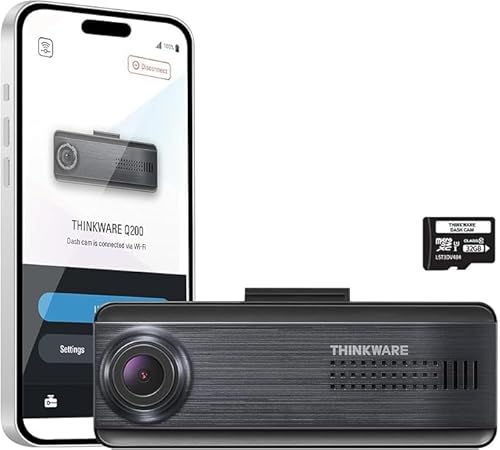
| Best Overall | Video Resolution: 2K QHD (1440P) | Recording Frame Rate: 30fps | Night Vision: Super Night Vision 2.0 | VIEW LATEST PRICE | Read Our Analysis |
| Thinkware F70 PRO Dash Cam 1080p FHD |

| Budget-Friendly Pick | Video Resolution: 1080p Full HD | Recording Frame Rate: 30fps | Night Vision: Super Night Vision | VIEW LATEST PRICE | Read Our Analysis |
More Details on Our Top Picks
THINKWARE Q200 2K QHD Dash Cam (1CH)
The THINKWARE Q200 strikes an ideal balance for drivers who want crystal-clear footage without breaking the bank. You’ll capture sharp 2K QHD video at 30fps through a distortion-free 125° wide-angle lens, while Super Night Vision 2.0 guarantees clarity even in low light. The built-in G-sensor automatically saves 20-second clips when impacts occur, and anti-file corruption technology protects your recordings from data loss.
You’ll appreciate the Smart Parking Surveillance that monitors your vehicle when parked, plus Wi-Fi connectivity lets you preview and download footage directly through the THINKWARE app on your phone.
- Video Resolution:2K QHD (1440P)
- Recording Frame Rate:30fps
- Night Vision:Super Night Vision 2.0
- Parking Mode:Smart Parking Surveillance with motion/impact detection
- Connectivity:Wi-Fi
- Included Storage:Free 32GB microSD card
- Additional Feature:2K QHD resolution
- Additional Feature:Anti-file corruption feature
- Additional Feature:ADAS speed alerts
Thinkware F70 PRO Dash Cam 1080p FHD
For rideshare drivers and parking lot commuters, the Thinkware F70 PRO Dash Cam delivers essential protection with its standout Smart Parking Mode that monitors your vehicle 24/7. Motion and impact detection automatically save 20-second clips before and after incidents, while Time Lapse mode extends surveillance using minimal power.
You’ll capture crisp license plates with 1080p Full HD recording at 30fps, and Super Night Vision enhances brightness in low-light conditions. The built-in Wi-Fi and Bluetooth connectivity let you adjust settings and transfer videos through the Thinkware Dash Cam Link app. Installation’s straightforward with included mounting hardware, 12V cable, and 32GB microSD card.
- Video Resolution:1080p Full HD
- Recording Frame Rate:30fps
- Night Vision:Super Night Vision
- Parking Mode:Smart Parking Mode with motion/impact detection
- Connectivity:Wi-Fi and Bluetooth
- Included Storage:32GB microSD card included
- Additional Feature:Bluetooth pairing capability
- Additional Feature:Thermal protection system
- Additional Feature:Optional GPS antenna
Factors to Consider When Choosing a Thinkware Dash Cam
When you’re selecting a Thinkware dash cam, you’ll need to evaluate several critical features that directly impact performance and usability. The video resolution and quality determine how clearly you’ll capture license plates and road details, while night vision capabilities guarantee you’re protected during low-light conditions. You should also assess parking mode features, storage capacity options, and connectivity through app integration to find the model that best suits your specific driving needs.
Video Resolution and Quality
Video resolution stands as one of the most critical specifications you’ll encounter when selecting a Thinkware dash cam, directly determining how clearly you can review footage after an incident. You’ll find that 2K QHD (1440p) cameras deliver sharper images with greater detail compared to 1080p Full HD models, making them superior for reading license plates or identifying road signs.
Frame rate matters too—30fps guarantees smooth playback with minimal motion blur. Look for Wide Dynamic Range (WDR) technology, which balances brightness and shadows in varying light conditions for consistently clear images. Night vision capabilities are equally important, as advanced technologies improve visibility and reduce noise during low-light recordings, making sure you capture usable footage regardless of time.
Night Vision Capabilities
While high resolution captures sharp details during daylight hours, your dash cam’s performance at night separates exceptional models from mediocre ones. Look for Thinkware models with Super Night Vision technology, which optimizes color balance and contrast to deliver true-to-life images in dark environments while minimizing noise and enhancing brightness.
Wide Dynamic Range (WDR) is essential for handling high-contrast scenarios, ensuring you’ll capture clear footage in both headlight glare and shadowed areas. Motion detection paired with night vision provides continuous surveillance while parked, documenting any incidents around your vehicle after dark.
Consider models with Time Lapse mode for extended nighttime monitoring. This feature records at lower frame rates, conserving power while maintaining overnight surveillance capabilities.
Parking Mode Features
Since your vehicle spends most of its time parked, robust parking mode features become essential when selecting a Thinkware dash cam. Smart Parking Mode provides continuous surveillance, monitoring for potential incidents or emergencies while you’re away. Look for models with motion and impact detection systems that automatically save 20-second video clips before and after events occur, ensuring you’ll capture vital evidence.
Time Lapse mode offers extended recording by capturing footage at lower frame rates like 2fps, which conserves storage space. Energy Saving modes extend battery life during parking surveillance without sacrificing security features. Additionally, thermal protection features prevent heat-related damage in extreme temperatures, maintaining device reliability. These parking capabilities transform your dash cam into a 24/7 security system for your vehicle.
Storage Capacity Options
Your choice of storage capacity directly affects how much footage your Thinkware dash cam can retain before loop recording begins overwriting older files. Thinkware models support varying capacities, with some accommodating up to 256GB for extensive video storage. While many include a free 32GB microSD card for immediate use, you’ll want to take into account upgrading for longer retention.
Recording resolution greatly impacts storage consumption—2K QHD footage requires considerably more space than 1080p Full HD. Reflect on your typical driving patterns when selecting capacity. If you frequently take long trips, larger cards guarantee thorough coverage without losing critical footage too quickly. Match your storage size to your recording needs and desired clip retention timeframe, balancing cost against the security of having adequate footage available.
Connectivity and App Integration
Beyond selecting adequate storage, you’ll need to evaluate how easily you can access and manage your dash cam’s footage. Thinkware models feature built-in Wi-Fi, enabling seamless connections to your smartphone or tablet. Through companion apps, you can remotely download videos and review playback without removing the memory card.
Some Thinkware dash cams incorporate Bluetooth for streamlined pairing and enhanced app functionality. You’ll adjust camera settings and view real-time footage directly from your mobile device, giving you complete control at your fingertips.
If you’re adding optional accessories like GPS antennas, the app provides access to additional features including speed tracking and red-light alerts. This integration guarantees you’re maximizing your dash cam’s capabilities while maintaining convenient access to all functions.
Installation and Setup Requirements
Most Thinkware dash cams come ready to install with everything you’ll need in the box—a mount, power cable, and microSD card. The setup process is designed for non-technical users, making it ideal if you’re a rideshare driver or first-time car owner. You can use adhesive cable clips to keep wiring neat and prevent distracting loose cables while driving.
Built-in Wi-Fi and mobile apps simplify configuration by letting you adjust settings and transfer videos remotely without removing the device. This eliminates complicated manual setup steps.
Some models offer optional accessories like GPS antennas that enhance functionality with location tracking. While these add extra installation steps, they’re worth considering if you want thorough recording features for your vehicle.
Advanced Safety Alert Systems
When evaluating Thinkware dash cams, advanced safety alert systems serve as essential decision-making factors that extend protection beyond simple recording. You’ll find Speed and Red Light Alerts particularly valuable, as they notify you of upcoming speed limits and red light intersections to prevent costly violations. Advanced Driver-Assistance Systems (ADAS) enhance your vehicle safety through lane departure warnings and forward collision alerts, helping you avoid potential hazards. Look for models with G-sensor technology that automatically detects sudden movements or impacts, capturing vital footage before and after incidents. Super Night Vision integration maintains visibility and detail in low-light conditions, improving your awareness during nighttime driving. If you frequently park in public areas, Intelligent Parking Mode activates surveillance features, detecting impacts or motion automatically.