

You’ve probably realized your smartphone can do more than just navigate—it can protect you on the road. Finding the right dash cam app isn’t about downloading the first option you see; it’s about choosing one that captures high-quality footage, preserves critical moments, and doesn’t drain your battery before you reach your destination. Some apps claim to offer premium features, but do they actually deliver when you need them most?
Quick Overview
- VEECAR app connects via 2.4G WiFi to VEEMENT dash cam for remote footage access and camera management.
- 70mai app supports iOS and Android with built-in WiFi for video playback and G-sensor collision footage review.
- Viidure app uses 5G WiFi for live preview, video sharing, and managing 4K front/rear dash cam recordings.
- ROVE app enables 20MB/s downloads, GPS route tracking with speed data, and 24-hour parking mode management.
- E-YEEGER app provides WiFi control for remote recording management with H.265 encoding for efficient storage optimization.
| VEEMENT 2.5K Dash Cam with WiFi & Night Vision |
| Budget-Friendly Pick | Front Resolution: 2.5K (2560×1440P) | Field of View: 160° wide-angle | WiFi Connectivity: 2.4G WiFi with VEECAR app | VIEW LATEST PRICE | Read Our Analysis |
| 70mai Dash Cam M310 1296P QHD |

| Best Value | Front Resolution: 1296P QHD (2304×1296P) | Field of View: 130° wide-angle | WiFi Connectivity: Built-in WiFi with 70mai app | VIEW LATEST PRICE | Read Our Analysis |
| 4K Dash Cam Front and Rear with WiFi |

| Best Overall | Front Resolution: 4K (3840×2160P) | Field of View: 170° front | WiFi Connectivity: 5G WiFi with Viidure app | VIEW LATEST PRICE | Read Our Analysis |
| ROVE R2-4K Dual Dash Cam with 128GB |

| Premium Choice | Front Resolution: 4K (3840×2160P @30fps) | Field of View: 150° front | WiFi Connectivity: Dual-band 5G WiFi (5GHz/2.4GHz) with ROVE app | VIEW LATEST PRICE | Read Our Analysis |
| E-YEEGER 2.5K WiFi Dash Cam with App |

| Most Compact | Front Resolution: 2.5K (2560×1440P) | Field of View: 160° wide-angle | WiFi Connectivity: WiFi with app control | VIEW LATEST PRICE | Read Our Analysis |
More Details on Our Top Picks
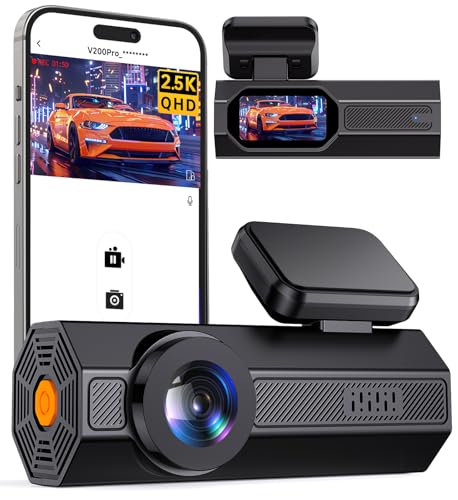
VEEMENT 2.5K Dash Cam with WiFi & Night Vision
The VEEMENT V200Pro delivers 2.5K resolution through a compact 1.47-inch design that won’t obstruct your view while driving. You’ll connect to the VEECAR app via 2.4G WiFi on your iOS or Android device to access footage captured by its 160° wide-angle lens. The F1.6 aperture and WDR technology guarantee clear night recordings, while the G-sensor automatically locks footage during collisions. You can enable 24/7 parking monitoring with a hardwire kit, and the camera handles extreme temperatures from -40℉ to 185℉. It supports SD cards up to 256GB and includes mounting accessories for quick installation.
- Front Resolution:2.5K (2560×1440P)
- Field of View:160° wide-angle
- WiFi Connectivity:2.4G WiFi with VEECAR app
- Storage Capacity:Up to 256GB SD card
- Parking Monitor:24/7 parking monitor (hardwire kit required)
- Night Vision:F1.6 aperture with WDR technology
- Additional Feature:1.47 inches IPS Display
- Additional Feature:Easy pry tool included
- Additional Feature:WDR technology balancing
70mai Dash Cam M310 1296P QHD
When image clarity matters most, the 70mai Dash Cam M310 stands out with its 1296P QHD resolution that’s 1.5 times sharper than standard 1080P cameras. You’ll capture crisp footage through its 130° wide-angle lens, while WDR technology balances exposure in challenging light conditions. The built-in WiFi connects seamlessly to your iOS or Android device, letting you review and download footage instantly. You’ll appreciate the G-sensor that automatically locks collision footage and the time-lapse feature that compresses 30 minutes into one minute. For 24-hour parking surveillance, you’ll need the optional UP03 Hardwire Kit. The system supports microSD cards up to 256GB.
- Front Resolution:1296P QHD (2304×1296P)
- Field of View:130° wide-angle
- WiFi Connectivity:Built-in WiFi with 70mai app
- Storage Capacity:16GB to 256GB microSD
- Parking Monitor:24-hour surveillance (Hardwire Kit UP03 required)
- Night Vision:WDR technology with 3D noise reduction
- Additional Feature:3D Noise Reduction
- Additional Feature:18-month warranty included
- Additional Feature:Time-lapse Recording feature
4K Dash Cam Front and Rear with WiFi
Drivers seeking cinema-quality footage combined with effortless smartphone control will find their match in the 4K Dash Cam Front and Rear with WiFi. You’ll capture stunning 4K resolution from the front camera while the rear records in 1080P, both connected through the Viidure app via 5G WiFi. The app lets you preview live footage, manage recordings, and instantly share videos to social media platforms. You’ll appreciate the 170° front and 140° rear field of view that minimizes blind spots. The G-sensor automatically locks collision footage, while optional hardwiring enables 24/7 parking surveillance with time-lapse recording up to 72 hours.
- Front Resolution:4K (3840×2160P)
- Field of View:170° front
- WiFi Connectivity:5G WiFi with Viidure app
- Storage Capacity:Up to 128GB (64GB included)
- Parking Monitor:24/7 monitoring (hardwiring kit required)
- Night Vision:F1.8 aperture with 6-layer optical lens
- Additional Feature:5G WiFi connectivity
- Additional Feature:3-inch IPS screen
- Additional Feature:64GB SD card included
ROVE R2-4K Dual Dash Cam with 128GB
Premium dual-channel recording makes the ROVE R2-4K ideal for drivers who demand professional-grade footage from both front and rear angles. You’ll capture stunning 4K resolution at 3840x2160P from the front camera and 1080P from the rear, with 150° and 140° wide angles respectively.
The Sony IMX675 STARVIS 2 sensor guarantees exceptional image quality in low-light conditions through F1.5 and F1.8 apertures. You’ll download videos at 20MB/s using dual-band 5G WiFi through the ROVE app, which manages settings and firmware updates.
Built-in GPS tracks your speed and routes on the 3″ IPS display, while 24-hour parking mode offers timelapse, motion detection, and collision monitoring. The included 128GB microSD card supports your recording needs immediately.
- Front Resolution:4K (3840×2160P @30fps)
- Field of View:150° front
- WiFi Connectivity:Dual-band 5G WiFi (5GHz/2.4GHz) with ROVE app
- Storage Capacity:Up to 1TB (128GB included)
- Parking Monitor:24-hour parking mode with timelapse/motion/collision detection
- Night Vision:F1.5 aperture (front), F1.8 (rear) with Sony STARVIS 2 sensor
- Additional Feature:Sony IMX675 STARVIS sensor
- Additional Feature:Built-in GPS tracking
- Additional Feature:128GB microSD card included
E-YEEGER 2.5K WiFi Dash Cam with App
The E-YEEGER 2.5K WiFi Dash Cam delivers exceptional video clarity with its 2560x1440P resolution, capturing 70% more detail than standard 1080P cameras. Its 160° wide-angle lens covers four traffic lanes while reducing blind spots. You’ll appreciate the F1.8 aperture that increases light intake by 30% for superior night vision. The app lets you manage recordings and adjust settings remotely through WiFi control. Loop recording continuously overwrites old footage, while the G-sensor locks critical moments. You’ll get a 32GB SD card included, with support for up to 256GB using H.265 encoding that saves 50% more memory.
- Front Resolution:2.5K (2560×1440P)
- Field of View:160° wide-angle
- WiFi Connectivity:WiFi with app control
- Storage Capacity:Up to 256GB (32GB included)
- Parking Monitor:24/7 parking mode (hardwire kit required)
- Night Vision:F1.8 aperture, 30% increased light intake
- Additional Feature:Aluminum alloy shell
- Additional Feature:H.265 encoding technology
- Additional Feature:32GB SD card included
Factors to Consider When Choosing a Dash Cam Mobile App
When selecting a dash cam mobile app, you’ll need to evaluate several technical capabilities that directly impact your user experience. The app’s WiFi connectivity speed determines how quickly you can access footage, while compatibility with your smartphone’s operating system guarantees seamless integration. You should also assess the live preview quality, file transfer efficiency, and the extent of remote control features available for adjusting camera settings on the go.
WiFi Connectivity Speed Options
WiFi connectivity speed directly impacts how quickly you’ll transfer videos from your dash cam to your smartphone, making it a critical factor in your app selection. You’ll encounter dash cams offering 2.4GHz connectivity, which provides extended range, or 5GHz options that deliver faster data transfer rates. Advanced models feature dual-band WiFi, letting you switch between frequencies based on your environment and needs. Some dash cams achieve download speeds up to 20MB/s, enabling quick file transfers and smooth live streaming to your mobile app. You’ll need to maintain a stable connection for effective app control, as weak signals cause interruptions during video management and settings adjustments. Verify your dash cam’s built-in WiFi capabilities align with your local network for peak app compatibility and performance.
Compatible Operating Systems
Beyond connection speeds, you’ll need to confirm that your chosen dash cam app runs smoothly on your smartphone’s operating system. iOS and Android dominate the mobile landscape, yet not all dash cam manufacturers provide equal support for both platforms.
Start by confirming the app works with your device. Some developers optimize features differently—iOS apps might leverage Apple’s ecosystem integration, while Android versions offer greater customization.
Test the user interface on your specific operating system. An app that’s intuitive on Android might feel clunky on iOS, or vice versa.
Check the update frequency for your platform. Regular updates guarantee security patches and new features remain compatible with your OS version. Apps that neglect one platform often experience bugs and performance issues.
Live Video Preview Quality
Crystal-clear visual feedback separates exceptional dash cam apps from mediocre ones. You’ll want your app’s live preview to match your camera’s recording resolution—ideally 2.5K (2560x1440P) or higher—ensuring you’re seeing exactly what’s being captured. A 160° field of view lets you monitor more of your surroundings, minimizing blind spots that could hide critical details.
5GHz WiFi connectivity dramatically improves your viewing experience by delivering faster transmission speeds and reducing annoying lag during real-time playback. This means you’ll see what’s happening without frustrating delays.
Don’t overlook advanced processing capabilities. Apps with noise reduction and enhanced low-light performance maintain preview quality when you’re driving at night or in challenging conditions, giving you reliable visual feedback regardless of environmental factors.
File Download and Transfer
Getting your footage off the camera matters just as much as recording it in the first place. You’ll want an app that makes downloading videos quick and painless. Look for apps supporting dual-band WiFi connections, which deliver markedly faster transfer speeds compared to standard WiFi. This becomes essential when you’re dealing with large video files and need immediate access to your footage.
Consider apps that enable direct smartphone compatibility for seamless file management and downloads. The best options let you quickly select, download, and share videos directly to social media platforms without complicated workarounds. Also verify that your chosen app works smoothly with higher-capacity SD cards—some support up to 256GB—ensuring you can efficiently manage extensive recording libraries without compatibility issues.
Remote Camera Settings Control
The ability to adjust your dash cam’s settings remotely transforms how you interact with your device. Through Wi-Fi connectivity, you’ll manage camera configurations directly from your smartphone without physically accessing the mounted unit. This convenience becomes essential when fine-tuning settings while driving or adjusting parameters based on changing conditions.
Look for apps offering extensive customization options, including video resolution adjustments, loop recording duration modifications, and G-Sensor sensitivity controls. These features let you enhance recording quality and storage management according to your specific needs.
Advanced apps also provide firmware update capabilities, ensuring your dash cam operates with the latest improvements and bug fixes. Real-time preview functionality allows you to verify camera angles and adjust positioning remotely, guaranteeing ideal coverage of the road ahead.
Video Playback Interface Design
How quickly can you locate critical footage when you need it most? A well-designed video playback interface makes this process effortless. You’ll want an app that offers intuitive guidance without unnecessary complexity, allowing you to access recorded footage immediately.
Essential features include fast-forward and rewind capabilities for efficient segment review. Timestamp overlays help you pinpoint exact moments of interest, while timeline integration with thumbnails provides visual cues for traversing longer recordings. These elements transform hours of footage into manageable, searchable content.
Mobile compatibility matters considerably. Your chosen app should adapt seamlessly to various screen sizes while maintaining efficient video loading times. Poor optimization creates frustrating delays that defeat the purpose of quick evidence retrieval. Prioritize apps that balance extensive playback features with responsive performance across devices.
Social Media Sharing Features
While capturing footage is essential, sharing vital moments shouldn’t require complex workarounds or multiple app transfers. Look for dash cam apps offering direct integration with YouTube, Twitter, and Facebook. This feature lets you upload videos instantly from the app interface—a capability that 25% of users consider essential when selecting their app.
Quality apps include editing tools for creating engaging highlights before posting. You can trim unnecessary footage, add captions, and tag locations without switching between applications. This streamlines your workflow considerably.
Beyond personal convenience, social media features foster community interaction. You’ll connect with other dash cam users, exchange driving tips, and discuss footage together. These shared experiences enhance the overall value of your dash cam investment while building meaningful connections with fellow drivers.
GPS Route Tracking Display
Beyond sharing capabilities, GPS route tracking display transforms your dash cam app into an extensive driving monitor. You’ll view real-time speed and compass direction directly on your app interface, giving you instant awareness of your driving metrics. The system records precise driving routes that become invaluable during accident investigations or insurance claims, providing concrete evidence of your location and movements.
Advanced apps display speed stamps alongside your recorded video, adding essential context to captured footage. They’ll also mark event locations automatically, making it easier to organize and retrieve specific video segments later. You can access and manage your recorded footage with corresponding GPS data through user-friendly interfaces, enabling seamless playback and thorough review of your trips whenever needed.


